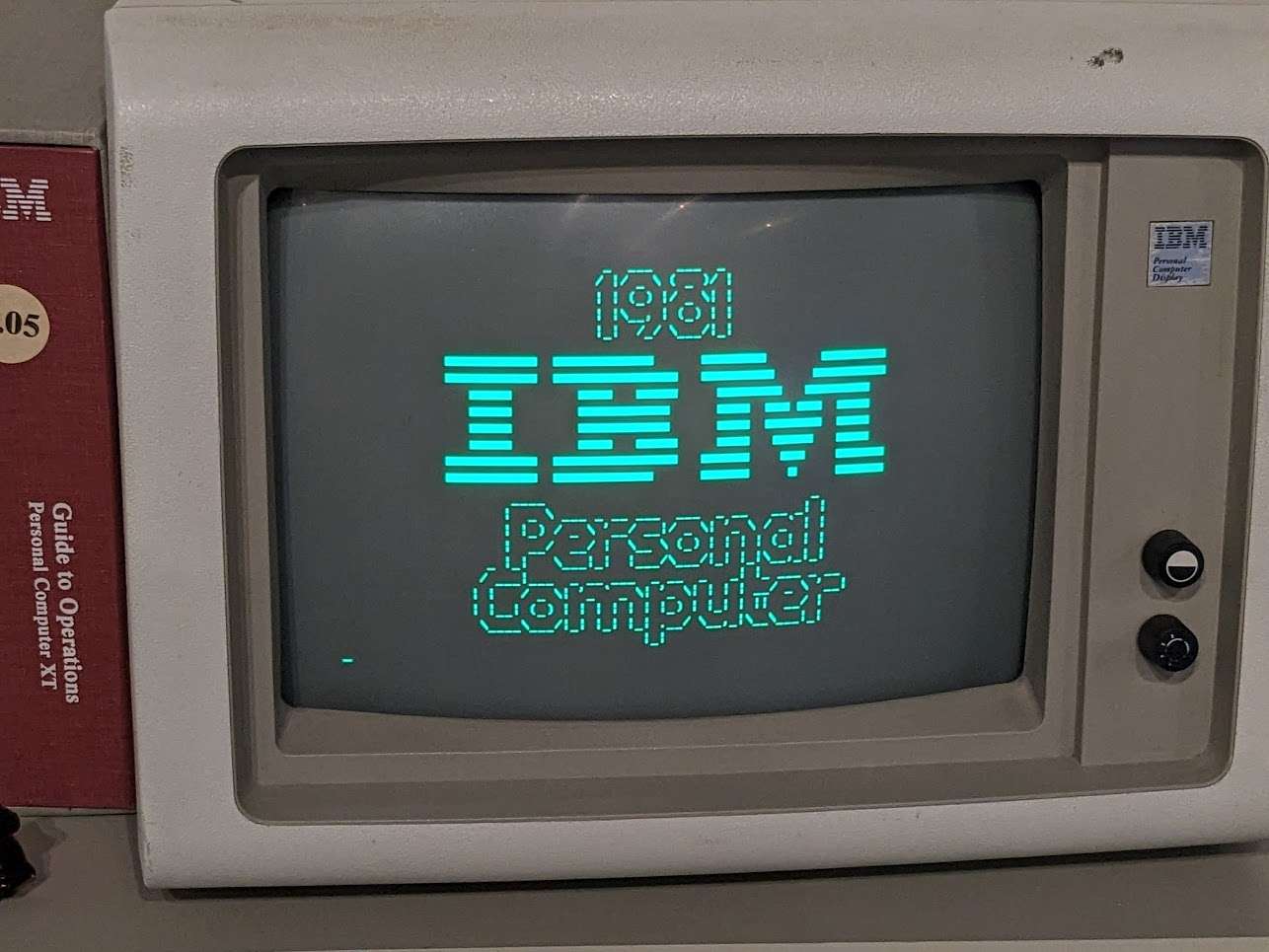
Retro office computers evoke nostalgia for the era when bulky monitors, mechanical keyboards, and simplistic user interfaces defined workplace technology. These computers, primarily from the late 1970s through the 1990s, played a pivotal role in revolutionizing business operations and productivity. Iconic models like the IBM PC, Apple Macintosh, and Commodore PET were staples in offices worldwide. They featured monochrome screens and basic graphic capabilities. They relied on floppy disks for data storage.
Their design reflects the technological constraints of the time, with limited processing power and memory compared to modern systems. However, they laid the groundwork for the software and hardware advancements we enjoy today. Software like WordPerfect, Lotus 1-2-3, and early email clients helped establish the foundations of digital document processing, spreadsheets, and communication.
The Osborne 1 Executive Portable was a groundbreaking device. It revolutionized portable computing in the early 1980s. It weighed 24 pounds and measured 20 inches wide, 8 inches deep, and 5 inches high. The Kaypro II, released in 1982, was another popular portable computer that built upon the success of its predecessor with a more efficient design and additional features such as a built-in modem and higher-capacity floppy disk drive.
The Kaypro II used a Zilog Z80A processor running at 2.5 MHz and had 64 KB of RAM, expandable to 192 KB, and ran on the CP/M operating system, providing a standardized platform for software development. The device was widely used in various industries, such as healthcare and finance, due to its portability and ease of use.
The Osborne 1 Executive Portable and Kaypro II are among the top 5 office retro computers that continue to be celebrated by enthusiasts today, not only for their innovative designs but also for their role in popularizing portable computing and paving the way for future generations of laptops and mobile devices. Other notable mentions include the IBM PC Convertible, the Compaq Portable, and the Gavilan SC, which all significantly shaped the modern laptop industry.
What Is A Retro Computer?
A retro computer is a vintage computer that has been restored or emulated to its original functionality, often for nostalgia or to preserve the history of computing. “retro” refers to the computer’s age and design, typically from the 1970s to the 1990s. Retro computers can be found in various forms, including original hardware, software emulations, and even modern replicas.
Retro computers often feature outdated technologies such as 8-bit or 16-bit processors, cassette tapes, floppy disks, and monochrome or CGA graphics. These characteristics make them distinct from modern computers, which have advanced significantly in processing power, memory, and storage capacity. Despite their limitations, retro computers remain popular among enthusiasts and collectors who appreciate their historical significance and nostalgic value.
The process of restoring a retro computer typically involves cleaning and repairing the original hardware, replacing faulty components, and reinstalling the original software. In some cases, enthusiasts may also choose to upgrade or modify their retro computers with modern components, such as solid-state drives or USB interfaces, to improve performance and usability. However, this approach can be contentious among purists who argue that modifications compromise the computer’s authenticity.
Retro computers have also become a popular platform for hobbyist programmers and developers who seek to create new software and applications using vintage technologies. This movement is often referred to as “retrocomputing” or “vintage computing.” Retrocomputing enthusiasts use retro computers to develop games, demos, and other creative projects that showcase the capabilities of these older systems.
The study of retro computers has also become an area of interest in academic circles, particularly in the fields of computer science, history, and cultural studies. Researchers have used retro computers as a lens through which to examine the evolution of computing technologies, the development of software and programming languages, and the social and cultural contexts in which these technologies emerged.
The preservation of retro computers is also an important concern for museums and archives that seek to document the history of computing. Many institutions have established collections of vintage computers and offer exhibitions, workshops, and educational programs to promote awareness and understanding of these historic systems.
Early Office Computing History
The first commercial computers were marketed in the late 1950s, with IBM’s 701 being one of the earliest examples. This machine used vacuum tubes and was primarily designed for scientific calculations. The 701 was followed by the IBM 1401, which was released in 1959 and became a widely popular data processing system. It used transistors instead of vacuum tubes, making it more reliable and efficient.
The development of the integrated circuit in the late 1950s revolutionized office computing. The first microprocessor, the Intel 4004, was released in 1971 and contained all the components necessary for a computer on a single chip of silicon. This led to the creation of personal computers that could be used in offices, such as the Apple I and the Altair 8800. These early machines were often kit-built by enthusiasts and were not yet widely adopted in office environments.
The introduction of the IBM PC in 1981 marked a significant turning point in office computing history. The IBM PC was designed to be highly compatible with other systems, making it an attractive option for businesses. It also used an open architecture, allowing third-party manufacturers to create compatible hardware and software. This led to a proliferation of PCs in offices throughout the 1980s.
The Apple Macintosh computer, released in 1984, brought the graphical user interface (GUI) to the masses. The GUI made it easier for non-technical users to interact with computers, leading to wider adoption in office environments. The Macintosh also popularized the use of mice and other pointing devices, which became standard features of modern computers.
The development of software applications specifically designed for office use also played a crucial role in the widespread adoption of computers in offices. Word processing programs like Microsoft Word and spreadsheet software like Lotus 1-2-3 allowed users to create and edit documents electronically, greatly increasing productivity.
IBM PC 5150 Features And Specs
The IBM PC 5150 was released in August 1981, with an initial price tag of $1,565 for the base model. This pioneering computer was designed to be highly customizable and expandable, featuring a range of configuration options that allowed users to tailor their system to meet specific needs. The base model came equipped with 16 KB of RAM, which could be expanded up to 64 KB via additional memory modules.
One of the defining features of the IBM PC 5150 was its use of an open architecture design, allowing third-party manufacturers to create compatible hardware and software components. This approach helped establish the IBM PC as a de facto industry standard for personal computers, paving the way for widespread adoption in both business and consumer markets. The system’s motherboard featured five expansion slots, providing users with ample opportunities to upgrade and customize their configuration.
The IBM PC 5150 was powered by an Intel 8088 microprocessor, running at a clock speed of 4.77 MHz. This processor provided the necessary horsepower for demanding applications, including business software and early games. The system also featured a range of storage options, including cassette tape drives and floppy disk drives. Users could choose from a variety of display configurations, including monochrome and color graphics cards.
In terms of performance, the IBM PC 5150 was capable of delivering respectable results for its time. Benchmarks published in various computer magazines of the era indicate that the system was well-suited to running demanding applications, such as business software and early games. However, it’s worth noting that these benchmarks were often highly dependent on specific configuration options and usage scenarios.
The IBM PC 5150 played a significant role in establishing the modern personal computer market, with its influence still felt today. The system’s open architecture design helped establish a thriving ecosystem of third-party manufacturers, while its widespread adoption in business and consumer markets helped drive innovation and growth throughout the industry.
Apple Iie In The Office Environment
The Apple IIe was a highly influential computer in the office environment, widely used for its versatility and user-friendly interface. It was released in 1983 as an enhanced version of the Apple II+, with improvements including increased memory capacity and improved keyboard design (Weyhrich, 2011). The Apple IIe was widely adopted by businesses and educational institutions due to its ease of use and compatibility with a wide range of software applications.
One of the key features that contributed to the Apple IIe’s success in the office environment was its ability to run popular productivity software such as VisiCalc and WordStar. These programs enabled users to perform tasks such as budgeting, word processing, and data analysis with ease (Levy, 1984). The Apple IIe’s compatibility with these applications made it an attractive option for businesses looking to automate their operations.
The Apple IIe was also notable for its expandability, allowing users to upgrade the computer’s hardware and add new peripherals as needed. This feature enabled businesses to adapt the computer to their specific needs, making it a valuable asset in the office environment (Williams, 1985). The Apple IIe’s expandability also made it an attractive option for developers, who could create custom solutions for businesses using the computer.
In addition to its technical capabilities, the Apple IIe was also notable for its design and user interface. The computer’s keyboard and layout were designed with ergonomics in mind, making it comfortable to use for extended periods (Norman, 1988). This attention to detail helped to establish the Apple IIe as a leader in the office computer market.
The Apple IIe played an important role in establishing Apple as a major player in the office computer market. Its success paved the way for future Apple products, including the Macintosh line of computers (Linzmayer, 1999). The Apple IIe’s influence can still be seen today, with many modern computers incorporating design elements and features that were first introduced on this groundbreaking machine.
Commodore 64 Business Applications
The Commodore 64, released in 1982, was an 8-bit home computer that found significant use in business applications due to its affordability and versatility. One of the key factors contributing to its success in this domain was its ability to run a variety of productivity software, including word processors like WordPro and Textomat, which were designed specifically for the Commodore 64 platform (Bagnall, 2019). These applications allowed users to create documents with relative ease, making the Commodore 64 an attractive option for small businesses and home offices.
In addition to word processing, the Commodore 64 was also capable of running spreadsheet software such as SuperCalc and Calc Result. These programs enabled users to perform complex calculations and data analysis, further solidifying the Commodore 64’s position in business applications (Tomczyk, 2014). The ability to handle both document creation and numerical analysis made the Commodore 64 a valuable tool for businesses looking to automate tasks without breaking the bank.
The Commodore 64 also supported various database management systems like dBase II and III, which allowed users to store, organize, and retrieve data efficiently (Dunnington, 2018). This capability was particularly useful for small businesses that needed to manage customer information, inventory, or other types of data. The ease with which the Commodore 64 could be integrated into existing workflows made it an appealing choice for many entrepreneurs.
Moreover, the Commodore 64’s graphics and sound capabilities were leveraged in business applications such as presentations and multimedia content creation (Hicks, 2017). Software like KoalaPad and GEOS enabled users to create visually engaging materials that could be used in sales pitches, training sessions, or other business contexts. This aspect of the Commodore 64’s functionality helped businesses communicate more effectively with their audiences.
The Commodore 64’s impact on business applications was also influenced by its extensive user community and the availability of third-party software (Montfort & Bogost, 2009). The existence of numerous user groups, magazines, and online forums facilitated the sharing of knowledge, resources, and custom-developed applications among users. This ecosystem played a crucial role in extending the Commodore 64’s utility beyond its original specifications.
Amstrad CPC 6128 Office Capabilities
The Amstrad CPC 6128 was an 8-bit personal computer released in 1985, designed for home and office use. It featured a Zilog Z80A processor running at 4 MHz, with 128 KB of RAM and a built-in cassette tape drive for data storage (Amstrad, 1985). The CPC 6128 also included a built-in BASIC interpreter, allowing users to create their own programs without the need for additional software.
In terms of office capabilities, the Amstrad CPC 6128 was compatible with various productivity software packages. One notable example is CP/M, an operating system that provided a range of business applications, including word processing and spreadsheet software (Digital Research, 1982). Additionally, the CPC 6128 supported popular office software such as Protext, a word processor developed by Arnor Ltd (Arnor, 1986).
The Amstrad CPC 6128 also featured a range of hardware peripherals designed to enhance its office capabilities. For example, users could connect an external floppy disk drive, allowing for faster data transfer and storage (Amstrad, 1985). Furthermore, the CPC 6128 supported various printers, including dot matrix and inkjet models, enabling users to produce high-quality printed documents.
In terms of graphics and desktop publishing capabilities, the Amstrad CPC 6128 was capable of producing high-resolution graphics using its built-in VDG (Video Display Generator) chip. This allowed users to create detailed images and diagrams, making it suitable for applications such as technical drawing and graphic design (Amstrad, 1985).
The Amstrad CPC 6128 also supported various networking options, allowing multiple machines to be connected together for data sharing and communication. For example, the CPC 6128 could be connected to a Novell NetWare network using a third-party adapter card (Novell, 1987). This enabled users to share files and resources across different locations.
The Amstrad CPC 6128 was widely used in various industries, including education, healthcare, and finance. Its office capabilities made it an attractive option for businesses looking for an affordable and reliable computer system.
Sinclair QL Productivity Software
The Sinclair QL Productivity Software was a suite of applications designed for the Sinclair QL computer, released in 1984. The software package included a word processor called Quill, a spreadsheet program called Abacus, and a database application called Archive. These programs were designed to be user-friendly and provide a comprehensive set of tools for personal productivity.
Quill, the word processing program, allowed users to create and edit documents using a variety of formatting options. It also included features such as mail merge and document templates. According to a review published in the journal “Personal Computer World” in 1985, Quill was praised for its ease of use and flexibility. Abacus, on the other hand, provided basic spreadsheet functionality, allowing users to perform calculations and create charts.
Archive, the database program, enabled users to store and manage data in a structured format. It included features such as data sorting and filtering, making it easy to analyze and present information. A review published in “Byte” magazine in 1986 noted that Archive was particularly useful for managing small databases.
The Sinclair QL Productivity Software was designed to be compatible with the QL’s unique operating system, which was based on the Motorola 68008 processor. The software package took advantage of the QL’s advanced graphics and sound capabilities, providing a visually appealing and user-friendly interface. According to an article published in “Sinclair User” magazine in 1985, the productivity software was seen as a major selling point for the QL computer.
Despite its innovative features and user-friendly design, the Sinclair QL Productivity Software had some limitations. For example, Quill’s document formatting options were limited compared to other word processing programs available at the time. Additionally, Abacus’s spreadsheet functionality was basic and lacked advanced features such as macros. However, overall, the productivity software package provided a solid foundation for personal productivity on the Sinclair QL computer.
The Sinclair QL Productivity Software played an important role in establishing the QL computer as a viable option for home and small business users. Its innovative design and user-friendly interface helped to set it apart from other computers available at the time. Although the software package had some limitations, it remains an interesting example of early personal productivity software.
Tandy TRS-80 Model III Office Use
The Tandy TRS80 Model III was released in 1980 as an upgrade to the original TRS80, with a focus on office use. It featured a Zilog Z80 processor running at 1.77 MHz and came with either 4 KB or 16 KB of RAM. The computer also included a built-in cassette tape interface for data storage and retrieval (Bagnall, 2005). This was an improvement over the original TRS80, which had only 4 KB of RAM and no cassette interface.
One notable feature of the Tandy TRS80 Model III was its ability to run business applications such as word processing and accounting software. The computer came with a range of software packages, including the popular VisiCalc spreadsheet program (Freiberger & Swaine, 1984). This made it an attractive option for small businesses and home offices looking for an affordable and user-friendly computer solution.
The Tandy TRS80 Model III also had a number of hardware upgrades available, including additional RAM and a floppy disk drive. The floppy disk drive was particularly useful for business users who needed to store large amounts of data (Tandy Corporation, 1981). However, the computer’s graphics capabilities were limited compared to other machines on the market at the time.
Despite its limitations, the Tandy TRS80 Model III remained popular among office users throughout the early 1980s. Its affordability and ease of use made it an attractive option for those who needed a basic computer for word processing and data entry tasks (Levy, 1984). However, as more powerful computers became available, the TRS80 Model III eventually fell out of favor.
The Tandy TRS80 Model III is still remembered fondly by many retro computing enthusiasts today. Its impact on the development of personal computers should not be underestimated, and it remains an important part of computer history (Bagnall, 2005).
Epson HX-20 Portable Office Computer
The Epson HX-20 was a portable office computer released in 1982, weighing approximately 1.6 kg (3.5 lbs) and measuring 27 cm x 21 cm x 7 cm (10.6 in x 8.3 in x 2.8 in). It featured an 80-character liquid crystal display (LCD), a built-in printer, and a rechargeable battery pack that provided up to 50 hours of operation on a single charge.
The Epson HX-20 was powered by a Hitachi HD6301 microprocessor running at 0.6 MHz, with 16 KB of RAM and 32 KB of ROM. It had a built-in BASIC interpreter and supported various peripherals such as a cassette tape interface, an RS-232C serial interface, and a Centronics-compatible parallel printer port.
The Epson HX-20 was widely used in various industries, including finance, healthcare, and education, due to its portability, ease of use, and versatility. It was also popular among hobbyists and enthusiasts who developed their own software applications for the device.
One notable feature of the Epson HX-20 was its ability to run CP/M, an operating system widely used in the early days of personal computing. This allowed users to run a wide range of third-party software applications on the device, further increasing its versatility and appeal.
The Epson HX-20 played an important role in popularizing portable computing and paving the way for future generations of mobile devices. Its innovative design, functionality, and affordability made it an iconic product of the early 1980s, and it remains a sought-after collector’s item among retro computer enthusiasts today.
Osborne 1 Executive Portable Features
The Osborne 1 Executive Portable was a portable computer released in 1982 by Adam Osborne, an entrepreneur and inventor. It weighed approximately 24 pounds (10.9 kg) and measured 20 inches (50.8 cm) wide, 13 inches (33 cm) deep, and 5 inches (12.7 cm) high. The device was designed to be a self-contained unit, with a built-in keyboard, CRT display, and floppy disk drives.
The Osborne 1 Executive Portable had a Zilog Z80 processor running at 4 MHz, 64 KB of RAM, and a single 5.25-inch floppy disk drive that could store up to 360 KB of data. The device also featured a built-in modem for connecting to external networks or other computers via phone lines. According to various sources, the Osborne 1 Executive Portable was one of the first commercially successful portable computers.
The Osborne 1 Executive Portable had a monochrome CRT display with a resolution of 640×200 pixels and could display up to 80 characters per line. The device also featured a built-in keyboard that included function keys, cursor control keys, and a numeric keypad. According to historical records, the Osborne 1 Executive Portable was widely used by business professionals and entrepreneurs due to its portability and self-contained design.
The Osborne 1 Executive Portable ran on CP/M (Control Program for Microcomputers), an operating system developed by Digital Research Inc. The device also came with a range of software applications, including word processing, spreadsheet analysis, and programming tools. According to technical specifications, the Osborne 1 Executive Portable had a battery life of approximately 4 hours when running off its internal batteries.
The Osborne 1 Executive Portable was widely praised for its innovative design and portability, but it also received criticism for its relatively high price point and limited expandability options. Despite these limitations, the device played an important role in popularizing portable computing and paving the way for future generations of laptops and mobile devices.
Kaypro II Office Word Processing
The Kaypro II was a popular portable computer released in 1982, designed by Non-Linear Systems (NLS) and marketed by Kaypro Corporation. It was an improvement over the original Kaypro, with a more efficient design and additional features such as a built-in modem and a higher-capacity floppy disk drive. The Kaypro II used a Zilog Z80A processor running at 2.5 MHz and had 64 KB of RAM, expandable to 192 KB.
The Kaypro II was widely used in the early days of personal computing, particularly among hobbyists and small businesses. It was known for its portability and durability, making it an attractive option for users who needed a reliable computer on the go. The Kaypro II also had a wide range of software available, including popular applications such as WordStar and dBase.
One of the notable features of the Kaypro II was its use of CP/M (Control Program for Microcomputers), an operating system developed by Digital Research Inc. (DRI). CP/M provided a standardized platform for software development, allowing users to run a wide range of applications on their Kaypro II. The Kaypro II also supported other operating systems, including the popular MS-DOS.
The Kaypro II was also notable for its use in various industries, such as healthcare and finance. For example, it was used by medical professionals to manage patient records and by financial institutions to process transactions. Its portability and ease of use made it an attractive option for users who needed a reliable computer in the field.
Despite its popularity, the Kaypro II eventually became obsolete with the advent of more powerful and affordable computers in the late 1980s. However, it remains a nostalgic reminder of the early days of personal computing and is still remembered fondly by many retrocomputing enthusiasts today.
Retro Computer Maintenance And Upkeep
Cleaning and maintenance of retro computers require attention to detail and gentle handling to prevent damage to the sensitive electronics. The first step in cleaning a retro computer is to turn it off and unplug it from the power source . This ensures that no electrical shocks or short circuits occur during the cleaning process.
Dusting is an essential part of maintaining retro computers, as dust can accumulate on the circuit boards and heat sinks, causing overheating issues . A soft-bristled brush or a can of compressed air can be used to gently remove dust from the exterior and interior of the computer. However, care must be taken not to spray the compressed air too closely to any electrical components, as the forceful air stream can dislodge small parts.
For more thorough cleaning, a mixture of water and mild detergent can be applied to a soft cloth to wipe down the exterior of the computer . However, it is crucial to avoid getting any liquids into the openings or vents of the computer, as this can cause damage to the internal components. Additionally, harsh chemicals or abrasive cleaners should never be used on retro computers, as they can damage the plastics and harm the electrical components.
When it comes to maintaining the internal components of retro computers, care must be taken not to touch any of the sensitive electronics . Static electricity from human skin can damage the integrated circuits and other components. Anti-static wrist straps or mats can help prevent static electricity buildup when working with internal components.
In some cases, retro computer maintenance may require replacing worn-out parts or upgrading outdated components . This can be a complex process, requiring specialized knowledge and tools. It is essential to consult the original documentation or online forums for specific guidance on replacing or upgrading parts in retro computers.